Containment & Microsegmentation
Stop ransomware from spreading across the hospital
An attack that reaches one system is an incident. An attack that spreads to hundreds is a catastrophe. Immune's containment stands between the two — isolating threats and segmenting the network the moment an attack is confirmed, so a foothold never becomes a hospital-wide shutdown.
Immune contains confirmed threats in seconds through automatic host isolation and network microsegmentation — blocking lateral movement while gating any patient-care-impacting action behind human approval.
Why spread is the difference between an incident and a disaster
The reason a ransomware attack can close an entire hospital is rarely that the first system was so important. It is that the attacker was able to move from that first system to everything else. Hospital networks are often flat and densely interconnected, which is convenient for clinical workflows and disastrous for security, because it means a single compromised workstation can reach file shares, servers, imaging archives, and the systems that hold the backups. The attacker's entire strategy depends on this freedom of movement — the lateral spread from a small foothold to the whole environment.
Containment is the discipline of taking that freedom away. If a compromised system cannot reach its neighbors, the attack has nowhere to go. It stalls in a tiny corner of the network while the rest of the hospital keeps running. This is why containment, and the microsegmentation that underpins it, is arguably the single most important control for surviving a ransomware attack: it is what turns a potential disaster back into a manageable incident.
See it in action
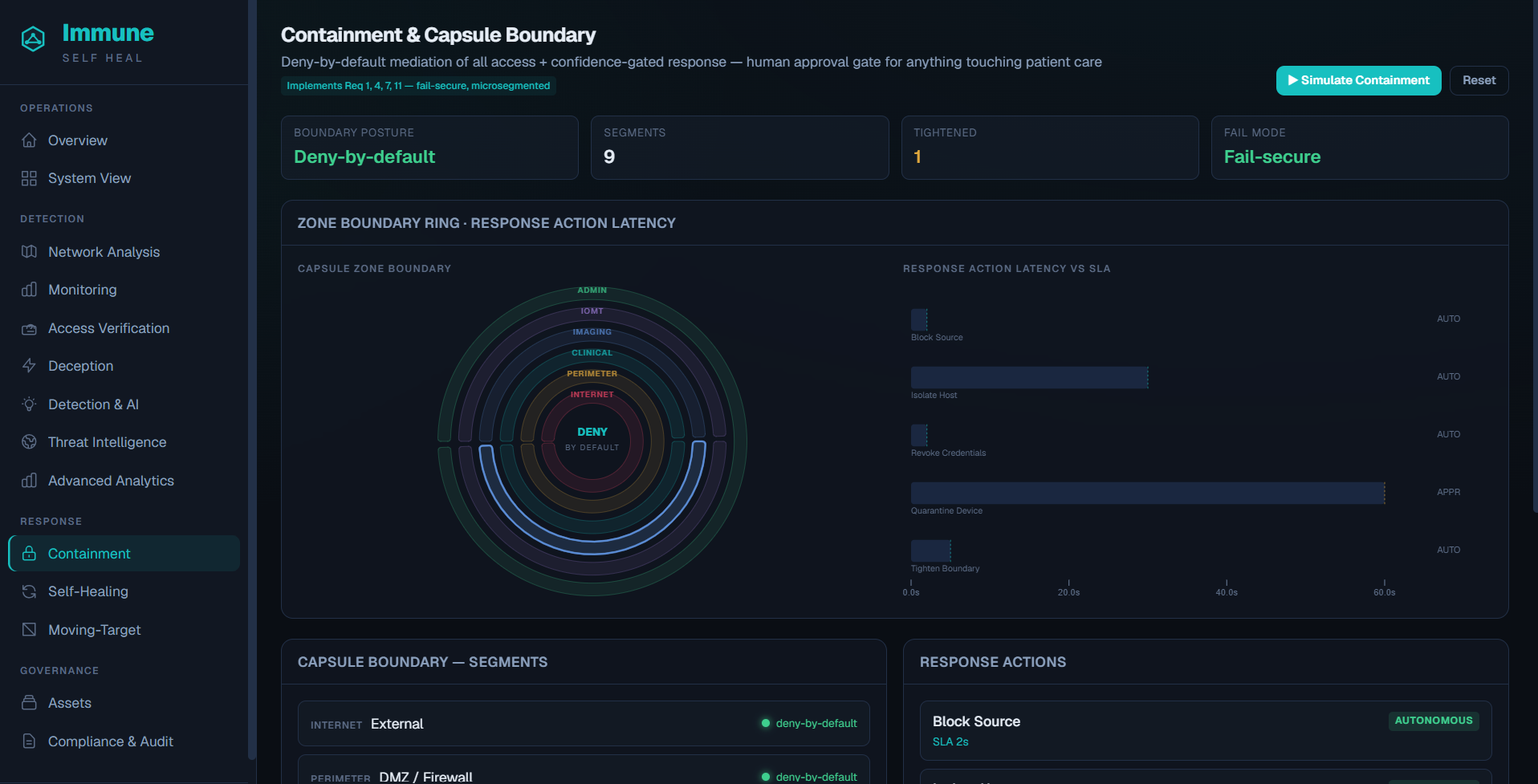
The containment console shows every segment, its posture, and active isolation actions — with patient-care-impacting decisions gated behind one-click approval.
Features
What containment provides
Host isolation
Separates a compromised system from the network so it can't be used to reach others.
Network microsegmentation
Divides the network into controlled zones that block lateral movement at the boundaries.
Malicious-source blocking
Cuts off the attacking identity, device, or address at the network boundary.
Credential revocation
Revokes compromised credentials and their active sessions to close the attacker's access.
Device quarantine
Isolates agentless medical devices at the network layer without powering them down.
Boundary auto-tightening
Reduces permitted sources and narrows segments automatically when a threat is confirmed.
How it works
How containment works
Receive the verdict
The detection engine confirms a threat with a confidence score and identifies the affected systems.
Choose the safest action
Immune selects the least disruptive actions that will stop the spread, based on your policy.
Act autonomously where safe
Low-risk actions — blocking a malicious source, isolating a non-clinical host — run immediately.
Gate care-impacting actions
Anything that could interrupt live patient care awaits a one-click human approval, while the source stays blocked.
Preserve continuity
A continuity mode keeps safe, read-only record access alive where possible, then hands off to recovery.
Advantages
The advantages of automatic containment
Contained blast radius
An attack is confined to a small zone instead of reaching critical systems.
Seconds, not hours
Confirmed encryption events are contained fast enough to actually matter.
Patient-safety first
Care-impacting actions are always gated behind human approval.
Safe for devices
Medical devices are quarantined, never shut down, preserving patient safety.
Fail-secure
The boundary keeps enforcing even if the control plane is unreachable.
Clean handoff to recovery
Once contained, self-healing restores exactly what was affected.
Use cases
Where containment matters
Halting lateral spread
Stop a compromised workstation from reaching servers, shares, and archives.
Isolating a compromised host
Separate an infected system while the rest of the hospital keeps running.
Quarantining a device
Cut a medical device off the network without interrupting its clinical function.
Cutting off the attacker
Block the malicious source and revoke its credentials in seconds.
Fast, but never reckless
Automatic where it's safe, human-approved where it counts
Speed matters enormously in containment — every second a threat spreads adds cost and risk — but speed cannot come at the expense of patient safety. A security system that automatically shut down a server in the middle of a surgery would be causing harm in the name of preventing it. Immune acts autonomously on the actions that are clearly safe and low-risk, because waiting on those would only help the attacker. For any action that could interrupt live patient care, it pauses and presents the security team with a clear, one-click decision — while continuing to block the malicious source in the meantime. The goal is to shrink the attack's footprint to the smallest possible size while keeping the hospital functioning.
Common questions
Containment and microsegmentation, answered
+How does microsegmentation stop ransomware?
Microsegmentation divides the network into tightly controlled zones so that a compromised system cannot freely reach others. When ransomware tries to spread, the segmentation boundaries block its lateral movement, containing the attack to a small area instead of letting it reach the whole hospital.
+What is ransomware containment?
Containment is the set of actions that stop a confirmed attack from spreading: isolating affected hosts, blocking the malicious source, revoking compromised credentials, and tightening network boundaries. Immune performs these automatically for low-risk actions and with human approval for anything that could affect patient care.
+Will automatic containment disrupt patient care?
Immune gates any containment action that could affect live care behind a one-click human approval, and quarantines medical devices at the network layer rather than shutting them down. Low-risk actions, like blocking a malicious source, run automatically; higher-impact ones wait for a human decision.
+How fast does Immune contain an attack?
Immune aims to contain a confirmed encryption event within about thirty seconds of the triggering signal, subject to the approval rules you configure — fast enough to stop the spread before it reaches critical systems.
+What is a continuity mode?
During containment, Immune can hold the environment in a continuity mode that preserves safe, read-only access to critical records where possible, so clinicians are not left completely without information while the response plays out.
+Does containment work for agentless devices?
Yes. Medical devices that cannot host an agent are contained by network quarantine — isolating their connectivity without powering them down — so an attack path is severed while the device stays safe for the patient.
Explore the platform
Related capabilities
Keep one compromised system from becoming a hospital-wide shutdown
Book a demo and see how Immune isolates threats and segments the network in seconds — safely, with patient care always in mind.